WORKING WITH OPERATING SYSTEM
We all know what a “computer” is, it’s one of those very
useful electronic devices that perform a variety of operations in accordance
with a set of instructions called program. By now all mid-aged teenagers might
know that a computer, in fact all electronic devices work on a simple cycle
called I-P-O cycle. Also it’s crystal clear that I/O would obviously stand for
Input and Output. Now what is P? P stands for “processing”. Processing actually
is what the computer does and displays the output in response of the input.
Being a computer science engineer we must know that, whatever this system does
is actually what generally we humans do. So then how does it make a difference?
The difference is that the computer works on a set of rules and these rules are
called protocols. It has some syntax i.e. conventions which it is bound to
follow. Since the processor is responsible for processing, it must be faster
than what our human brain is capable of doing and, it’s always faster.
Thus if computer processes just in the same way we humans
solve a problem then, it should practically use the same formulas we work on,
then what is going to make this system run on the same formulas? Well if we can
control the flow of signal as per our wish and compel the system to do what we
instruct then we can get the desired output, isn’t it? But that too doesn’t
seem pleasing as it’s not as easy as it seems to appear. To compel it to do
something we must have certain rules which it should follow. These rules are
nothing but “software”.
Software, another very complex but important term in
computing that is to be understood in depth. Software represents the set of
programs that governs the operation of a computer system and make the hardware
run. Technically software is a man-made program that can control the flow of
information depending on what we have coded it for. It’s just like an object
designed for particular work (Pencil’s work is to write where Eraser’s work is
to erase).
Software can be subdivided into two basic types:
• System Software.
• Application Software.
System Software:
As we observe the word “system” appears here so it obviously
has got something to do with the controlling of system. System software
primarily focuses on managing the hardware run properly, flow of information in
and out and governs the working of Application software.
It can be further divided into two types, viz. Operating
System and Language Processors.
Ex. of Operating system: Windows, Macintosh, UNIX, Linux,
etc.
Ex. of Language processors: Assembler, Interpreter,
Compiler.
Application Software:
Set of programs necessary to carry out operations of
specific application. These are the programs that are written as well as used
by the humans. These programs are written to fulfill the personal requirements
of human like an application for playing games. Does neither good nor any bad
to humankind or machines, just for our entertainment we have made the software.
Similarly there are several applications.
Ex. of the Applications: AutoCAD, MS-Word,
etc.
OPERATING SYSTEM:
An operating system can be defined as a program which acts
as an interface between a user and the hardware (i.e. all computer resources).
A simple way to understand the operating system is:
The above shown sketch depicts the interaction starting from
User till the Hardware/C.P.U.
To understand the Operating system (here onwards OS), we
compare it with real world. Our duty is to study and excel. For that we go to
different institutions. Now we are nothing but the ‘End User’. Teachers act as
application software, each expert in their field, conveying us the knowledge.
Here the Principal has no work practically i.e. they don’t consult us directly
but, they still control the institution and its proper functioning. Here
hardware is the classrooms, benches and other tools we use in school. The
Principal who they act as OS over here has to maintain proper conditioning of
the hardware, functioning of application software and also control the
interaction between the three.
In the same way OS acts as a guide, one that has been
designed such that it maintains a correct balance between user and applications
used by them, and the proper flow of data between the applications and
hardware.
Now as I have mentioned that an OS looks on both the
hardware and the user, the OS must have to separate units to do so. Thus OS has
two parts: Kernel and the Shell.
Kernel is responsible
for interacting with the hardware and the Shell is responsible for interacting
with the user.
Types of OS:
Real-time
A real-time operating system is a multitasking operating
system that aims at executing real-time applications. Real-time operating
systems often use specialized scheduling algorithms so that they can achieve a
deterministic nature of behavior. The main objective of real-time operating
systems is their quick and predictable response to events. They have an
event-driven or time-sharing design and often aspects of both. An event-driven
system switches between tasks based on their priorities or external events
while time-sharing operating systems switch tasks based on clock interrupts.
Multi-user vs.
Single-user
A multi-user operating system allows multiple users to
access a computer system concurrently. Time-sharing system can be classified as
multi-user systems as they enable a multiple user access to a computer through
the sharing of time. Single-user operating systems, as opposed to a multi-user
operating system, are usable by a single user at a time. Being able to have
multiple accounts on a Windows operating system does not make it a multi-user
system. Rather, only the network administrator is the real user. But for a
Unix-like operating system, it is possible for two users to login at a time and
this capability of the OS makes it a multi-user operating system.
Multi-tasking vs.
Single-tasking
When only a single program is allowed to run at a time, the
system is grouped under a single-tasking system. However, when the operating
system allows the execution of multiple tasks at one time, it is classified as
a multi-tasking operating system. Multi-tasking can be of two types:
pre-emptive or co-operative. In pre-emptive multitasking, the operating system
slices the CPU time and dedicates one slot to each of the programs. Unix-like
operating systems such as Solaris and Linux support pre-emptive multitasking,
as does AmigaOS. Cooperative multitasking is achieved by relying on each
process to give time to the other processes in a defined manner. MS Windows
prior to Windows 2000 and Mac OS prior to OS X used to support cooperative
multitasking.
Distributed
A distributed operating system manages a group of
independent computers and makes them appear to be a single computer. The
development of networked computers that could be linked and communicate with
each other gave rise to distributed computing. Distributed computations are
carried out on more than one machine. When computers in a group work in
cooperation, they make a distributed system.
Embedded
Embedded operating systems are designed to be used in
embedded computer systems. They are designed to operate on small machines like
PDA’s with less autonomy. They are able to operate with a limited number of
resources. They are very compact and extremely efficient by design. Windows CE
and Minix 3 are some examples of embedded operating systems.
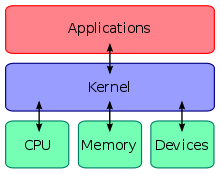
Kernel
With the aid of the firmware and device drivers, the kernel
provides the most basic level of control over all of the computer's hardware
devices. It manages memory access for programs in the RAM, it determines which
programs get access to which hardware resources, it sets up or resets the CPU's
operating states for optimal operation at all times, and it organizes the data
for long-term non-volatile storage with file systems on such media as disks,
tapes, flash memory, etc.
User interface
Every computer that is to be operated by an individual
requires a user interface. The user interface is not actually a part of the
operating system—it generally runs in a separate program usually referred to as
a shell,
but is essential if human interaction is to be supported. The user interface
requests services from the operating system that will acquire data from input
hardware devices, such as a keyboard, mouse or credit card reader, and requests
operating system services to display prompts, status messages and such on output
hardware devices, such as a video monitor or printer. The two most common forms
of a user interface have historically been the command-line interface, where computer commands are typed out
line-by-line, and the graphical user
interface, where a visual environment is present.
Most of the OS today run in Graphical User Interface or
commonly called GUI.